
46:44 Webinar
Making VMware Cloud Foundation More Predictable with Everpure
In this session, we will show how Everpure complements VMware Cloud Foundation by helping simplify storage choices across greenfield and brownfield deployments while improving operational consistency through vCenter integration, automation, and day-2 visibility.
This webinar first aired on June 25, 2026
The first 5 minute(s) of our recorded Webinars are open; however, if you are enjoying them, we’ll ask for a little information to finish watching.
Click to View Transcript
Hello everybody, and welcome to today's VMUG Live. I'm your host, Jason Langer, joined with my good friend Matthew Webb, and we are here representing Everpure as we're going to talk about VMware Cloud Foundation with Everpure, of course. As I said, I'm Jason Langer. I work here as a technical evangelist spoking, focusing on virtualization
and our cloud solutions. And Matt, you are a senior f- field solutions architect, if I can get it out of my mouth. Can you kinda tell me what that means, or tell the folks at home what that means? Yeah, no, it's, so, like, a field solutions a- architect or an FSA is kinda like a subject matter expert in a certain field.
and virtualization is, my domain of expertise. Now, I'm not quite a Jedi like Jason Langer, but I'm a Padawan, at Everpure. I've only been here about a year and a couple of months. but yeah, that's, that's essentially my role here. I'm in the field with customers talking about how they leverage our technology in VMware,
which is a perfect topic to talk about today. Perfect. Yeah, as you can see, I've got my Jedi robes on in my photo. Matt, we'll get yours to you sooner or later. but before we kick into things, just real fast, some folks might have not know, they might think Everpure, or I don't That name sounds familiar, or the color orange looks familiar.
We are the artists formerly known as Pure Storage. We changed our name a few months ago. So if you are familiar with our product, maybe you're a customer, or you've looked at us in the past, same great storage, great same solutions, same great integrations with VMware, which Matt is going to cover today.
But just know we've changed the name, and that's kind of my little PSA to the audience. one last thing I will say before I turn it over to you, Matt, is if you do have any questions or comments, we'll do our best to answer the questions live in the chat. So throw them in there, myself or Matt will try to follow along as best we can as we're presenting.
but with that, Matt, why don't you take us down the route of what VMware Cloud Foundation is? This, this whole group already, I mean, if you don't know what VCF is at this point, right? Like, what are we doing here? But- Yeah for those of you that maybe have just, you know, joined and, like, starting to
figure out that VCF is the platform moving forward, you know, some people don't know what that really means yet. I mean, ultimately, what VCF is, is the entire platform for VMware's new ecosystem, right? It's still built on the core technologies that you know, but it's all the, ancillary things that made the platform a cloud platform, right?
VMware's more than just a hypervisor and hypervisor management, which we know as vSphere and vCenter, right? It's network overlays. It's HCI software. It's monitoring. It's front-end interfaces for your users to
log into and create resources like in the, what used to be called the Aria Suite, now VCF Automation, right? It is the entire cloud platform, and that is, that is what VCF is at the end of the day. Um- Yeah, and it's true if it's on-prem or in the managed cloud as well, right? So you might have heard of like- Correct.
Yeah AVS or ES, Amazon Solutions. So it's- Yeah kind of the same format, whether it's on-prem or in the cloud. Whether it's AVS, Azure VMware Solution, or E-EVS from AWS or your infrastructure, same, same binaries, right? Same cloud platform.
So what, what are those bina- like, what is that software? So, one of the things to, to really understand is that there's now more things You, you always think of vCenter as the higher arching management platform, at least a lot of customers do, for the underlying hypervisor host. But the truth is the platform needs higher level management control planes for an entire
platform, and where that starts is at the fleet level. So you'll hear things called, like, a VMware Cloud Foundation fleet. At the fleet level, you have VCF operations and automation. There's actually more than that now. Like, we're not touching on all, even the nine dot one updates, but these are core
technologies that we're gonna t-touch on. Then at the instance level, that is the stuff that you may be more familiar with. That is vCenter for your hypervisor management, vSphere on the physical bare metal d- you know, devices you have, the servers you have. but that also includes network overlay like NSX, right?
so you have a fleet level now, and a fleet could m-ha-manage multiple instances. And then within that instance, you also have a concept of workload domains, and a workload domain will be like a vCenter boundary. So you'll have a vCenter for each of these workload domains, and they all roll up to VCF operations.
So again, plat- this is a cloud platform, right? You're probably used to ESXi and vCenter, but this is again, the entire cloud platform that includes, you know, network, and front-end, web interfaces for your users, as well as an, alerting, monitoring, and, and, everything else that comes with a cloud platform. Got it. So, you know, we, we've worked with this stack
for a long time, right, Langer? Like, I mean, I think one of the most interesting things I learned being a year in is did you know we started making a vSphere plugin literally at the same time we were building the Purity UI back in twenty twelve? Like- Wow. I mean, that makes sense when you see how well
they're, they're integrated, but yeah. Yeah. so, like, we've been working with VMware, ev- pretty much since our inception, which is different than our competitors. Yes, they may have beat us to a plugin. Like, I'm not gonna say we're the first plugin to market, but from creation of the company to
plugin, we definitely beat them there, right? This has been in our DNA. working with VMware has been, one of the core tenants. We focused on database and virtual storage infrastructure and VDI. Those were, like, the primary use cases.
So we've got the FA Management Pack, FA Content Pack, and Workflows. That, that goes into operations for the Management Pack. The FA Content Pack and Workflows are for the automation tool because obviously if you're gonna build blueprints and have your users deploy their own resources like in a cloud platform, you need to make sure storage is part of that, so we've been making those for
some time. The When we talk about VMware, we're talking about the FlashArray family. We are a much bigger company. you know, Langer already talked about how Everpure is fo-focusing on data because we do more than just FlashArray now, but when we talk about VMware workloads, this is, this is
where we started, and it starts with the FlashArray family. and all these other technologies kinda just stitch it together. They may not directly plug into your VMware tooling, but they definitely play a role. For example, like Fusion, we have a capability now to stitch all of our systems together into what's called the Enterprise Data Cloud, and that does work with the plugin.
So if you use Fusion, you make presets, you can deploy those presets via the vSphere plugin, which is really nice. we have Pure Protect if you're looking to protect workloads and have a, like, kind of a DR as a service kinda capability. Pure1 is our management plane that we house for you.
It's like a SaaS platform to be able to see really cool things. We're gonna talk about VM analytics, and the information we get in that, so that'll be really fun. And then, of course, we bring this all in with a very unique business model in Evergreen, which is really cool. Yeah, and I, like, comment that some of these are additional, like p- PureProtect, like,
that's kind of a disaster recovery as a service product or solution. Mm-hmm. But like the management packs, the content packs, the workflows, the plugin, you know, those are things that you get when you purchase a FlashArray or you receive, right? So these are not additional licenses or things that you've gotta think like,
"Oh, I've got a FlashArray. I'm gonna run it with VMware VCF. What are the additional licenses I need to purchase or, you know, add?" Those are all inclusive of the FlashArray itself, of, of the system that you've purchased. Yeah. That's a great call out 'cause like, you know,
usually you're looking at potentially additional software licensing add-ons from other vendors. That's not the case for us. With, with some exceptions- Sure we have to be, you know, clear just like your call out on PureProtect. So, Langer and I had a really big debate on who had the better Yoda voice- and I think it
was Langer, right? No, it was you. No? It was you. No. Okay. So w- we're not going to embarrass anyone or make anyone cringe with a Yoda voice.
I think I'm gonna skip that part, but you definitely remember this from the Star Wars movie, right, Langer? Like, I remember when Yoda said, "On the HCL list your storage must be supported, in VCF 9 it is. And compatibility always check." Yoda's a wise man. Yes. I think what he was basically trying to tell
us, Langer, is that there's a lot of confusion with VCF because it does have a history. Uh- Sure the previous VCF versions, and you know this well, you worked on the product directly, it's, it was very opinionated. It had very strict controls of what was and wasn't supported. And while there is still a level of that in VCF 9, there's some confusion of, that this is
actually the most flexible platform, to date with the flexibility of storage options, which we're gonna go into, what technologies are used by default, right? Yeah. that's really the big takeaway. If you took anything away, from this session, just know whatever storage you're on today is likely on the HCL for VCF 9, and you can use that storage today in VCF 9.
So we're gonna get- Yeah into the nitty-gritty of that. Yeah, I mean, with that spoiler alert, you know, it's As your p- as your point, VCF 3 and 4, even 5 was a little bit more rigid, uh- Yeah about greenfield, right? Which we're gonna talk about. Because the new deployments had to be very The workflows were very script- So they'd be very prescriptive on what they support.
But the moment you open the door and say, "Hey, we're gonna allow brownfield deployments," or what they call a converged deployment or merged deployment, then you gotta go back and be like, "Oh, we gotta support iSCSI. We gotta support NFS version four. We've gotta do this." and so that's really where this piece comes in.
I know we're tongue in cheek on it, but just know that, like Matt said, if you're running Basically, if you're running current vSphere, so version 8 basically, there's a path for you to use whatever protocol in VCF. It's just h- how many hops or things you've gotta go through to get there. And starting with that, Matt, let's Why don't we talk about the protocols?
Yeah. 'cause there's a lot out there. Yeah. And this, this will be fun too 'cause, like, I mean, we've got Langer here, who worked on the product directly for many years, right? Like, we'll, we'll call that out in future slides of, like, the old VCF was X and the new VCF is this, right?
That's, you know, one of the things to take away. There's a lot of protocols out there. Like, you know, the, the reality, I think most of our customers, they choose one, they just stick on it, right? But, the reason why we're talking about protocols is, A, we are an all-inclusive array.
Our arrays are multi-protocol. You could have the same LUN and change the protocol it uses, right? you may need an additional card for NVMe. There may s- be some, some slight nuances. But we were built to be a unified storage platform that's inclusive of all these
protocols we're talking about. So number one, what's the big takeaway there? We can support pretty much any protocol you want on VCF. And to this point, you know, it's how you get there. There's a concept of greenfield versus brownfield versus supplemental, right?
And we're gonna go into deeper on each of those. But think of greenfield as I've got brand-new infrastructure. Maybe I've got a shiny new FlashArray, which good for you. I've got some new, you know, maybe Cisco UCS servers or, or some, you know, server vendors' models, and it's in a brand-new rack.
I've got nothing installed. It is green as greenfield could be. If I install that, I only support Fibre Channel or NFS v3 as, external storage, right? So, that is through the in- the VCF installer, which we'll see in a second. Brownfield is I'm taking This is the most common approach, right?
Like, I have existing infrastructure 'cause your vSphere upgrades don't always align with your new infrastructure r- refreshes. so a lot of people know I upgrade, you know, my, my vCenter first and then my ESXi host and bring them up to the same code versions. This is, like, the brownfield upgrade process we're most familiar with.
And then supplemental is, like, what I add after VCF 9's already been deployed, right? So let's We've already got the kinda, like, the definitions. Let's double-click into what that actually means. So on the greenfield side, before you even get to the installer, if you're going to deploy with something like FlashArray and use external storage, you'll be using either Fibre
Channel or NFS v3, not 4.1, but th- 3, and you actually need to configure that, on the host, before you actually launch the VCF installer process. So there's some prep that has to be done. These are, like, prerequisites. So you'll install vSphere 9 on the host.
You'll get, you'll get Fibre Channel set up. There's some slight nuances. Fibre Channel, you actually have to map that to the host. The NFS side, you just need to make sure that the, the mount point is available off of the system.
We won't get into the nitty-gritty details, but this is to get that point across. And then you launch the installer, and the installer is basically, if you haven't seen it yet, it's like a It's a UI workflow is what it is, right? It says It asks you a bunch of question about where DNS and NTP and all the basic infrastructure stuff that you need, so it can go deploy onto these hosts a vCenter,
NSX, VCF Ops, all of these things, and validate, run those prechecks, and make a VCF instance. And then when it deploys, it's got all the things on the other side. So what, what does that actually mean for brownfield? So when you look at brownfield, that's the upgrade process.
The installer's not making new resources, it's consuming existing resources. And the beauty about that portion of it is they call it a converged process. Instead of like create new, you're gonna choose what's called converged in the VCF installer. And so you already have these existing assets already deployed.
You've got a vCenter, you've got ESXi host, and you have FlashArray, there, and it can be running any protocol type that's supported on the HCL. There is no limitation. It's not just fiber channel or NFS. it's anything you want.
So here's kind of like the one thing. There is a KB out there, me and Langer were looking at it. Say you wanna do iSCSI on greenfield infrastructure. The process really is pretty simple. You install it the old school way of I install an e- ESXi 9 host.
I actually deploy a vCenter on that host, and then I start creating d- clusters and data stores. Then you do a, a converge process off of that, and that's kind of like the greenfield converge workaround if you just want iSCSI out of the gate on brand-new hardware. So all that word salad, Langer, for what?
What did Yoda tell us? Yeah. Like, it doesn't matter what heart You know, what, storage you wanna get to. You can get there. It's just gonna be a nuance of how you get there, depending on are you coming from existing assets?
Are you creating net new systems? There's just so much confusion here. That's what we wanted to do, is kinda like clarify that. Yeah. I just like to call it, and maybe you'll get this reference, Matt, it's just VCF with extra steps.
Like it's like you can still get there. It's still, quote-unquote, "greenfield," right? Because maybe you've never deployed any VMs, but from a VCF, in your iSCSI example- Yeah in the VCF mind is like, "Well, there's already a vCenter here, so I'm converging this. I'm not deploying everything." Yeah.
So yeah, I mean, I know- And it's under- it's understandable, right, Langer? Like, you've been, you've been doing this even longer than I have. we've been stuck in the typical 20-- like, 25 years of vSphere of the upgrade looks the same. I upgrade a vCenter, and then I upgrade a host. And yes, there's also an interop of different things.
Maybe I've got, you know, like the, the Omnissa VDI product, or I had these other things that I had to make sure there was interoperability with, but the core of it was the same process. That process definitely has changed- Yeah in the new VCF 9, and so customers confuse that with what, like, "You just rocked my world." Like, does this change everything?
Not quite. That's- Yeah that's the goal here is just to clarify what that means. Yeah. For those of the, you know, in the chat, if you're, if you were around for old You know, Matt, for the old schools, like, I've lived through the VDS 4, VDS upgrades in vSphere 4, or the single sign-on upgrades in vSphere- Oof dot five that those were, those were
interesting times, for sure, so. Or the client going away for the, the web client, right? Right. Right. Yeah, there's- Yeah. It's always gone smooth, but there's always been a little bit of hiccups in there. Yeah. But you know, so we've covered some of, like, what I would really say is some of the table
stakes, Matt, for VCF in general, but- Mm-hmm regardless probably who the storage vendor is really. But now it's like, but why Everpure? Why, why would If somebody's on the, this webinar, maybe you're not a, an Everpure customer, you're looking into it, why would they look at us over, say, somebody else?
I won't mention any names. Yeah. No, definitely. It's, it's funny. I'm sure they're thinking, "Why is my s- you know, why is my storage vendor talking about my upgrade process?" You know? Right. Yeah. Like, no, it's all about understanding
the storage options, and now we're, we're diving into if you-- maybe you're not an Everpure customer and you're curious of what we do, that's, that's this section here. So especially in VCF, you know, there's this additional licensing you get that you're probably thinking about using. We'll just call it a spade a spade.
There is HCI licensing that's in- involved in VCF out of the gate, and so a lot of customers are asking, you know, "Do I use this? What are, what are the limitations? What does this mean for my infrastructure?" You know, fortunately between me and Langer, y- like, you have some experience here.
You know, ask these questions in the Q&A. But what we've, we've experienced is that we now understand where the bottlenecks are in HCI and how, w- where it can be a source of pain and where it can be beneficial, right? Yeah. So really it's all about eliminating both stranded compute and storage.
it'd be really nice if every workload was h- honestly kinda like VDI. Like, they are the same, it's T-shirt sizes, and it scales, you know, linearly. Or I, I should say just, you know, consistently in one direction. the r- the truth is most, most server infrastructure does not do that. It is I've got one giant workload that's a file server.
It's a lot of capacity and low on IO. I've got a bunch of app servers that are really intense on compute but tiny on storage. I remember working at an HCI vendor, and a customer had those application servers. Tiny storage need but tons of compute, but were licensed per CPU. That was a real pain for them, right?
So there's all these scenarios that really leave these stranded capacities in different areas that external storage can really add a big benefit. It, it, you know, eliminates the potential of the stranded compute and storage, but it also limits the administration overhead, right? And so ultimately, at the end of the day, this lowers TCO, it improves ROI, and it does
stitch together a more cohesive, if I need to scale compute, I scale compute, which includes memory. If I need to con- you know, s- scale storage, I can scale that appropriately as well. And especially in this day and age of, you know, pricing for, power is going up, that can also have an impact on your overall power bill, and, and how that looks
inside your infrastructure. So you know, again, it's all about dec- decreasing cost and risk at the end of the day. And just to be fair to our hosts, I will say It's not an either/or conversation. Yeah. Like it's an, it's an if/and conversation of like maybe external storage for these workloads, maybe not for these workloads.
So I, may- I just wanna make sure if it's like it's not We're not viewing it as like ones and zeros. It's, it's- Yeah more like twos and threes, not ones and zeros, so. Yeah. Exactly. Exactly. Yeah. like, you know, our feature set, ours is
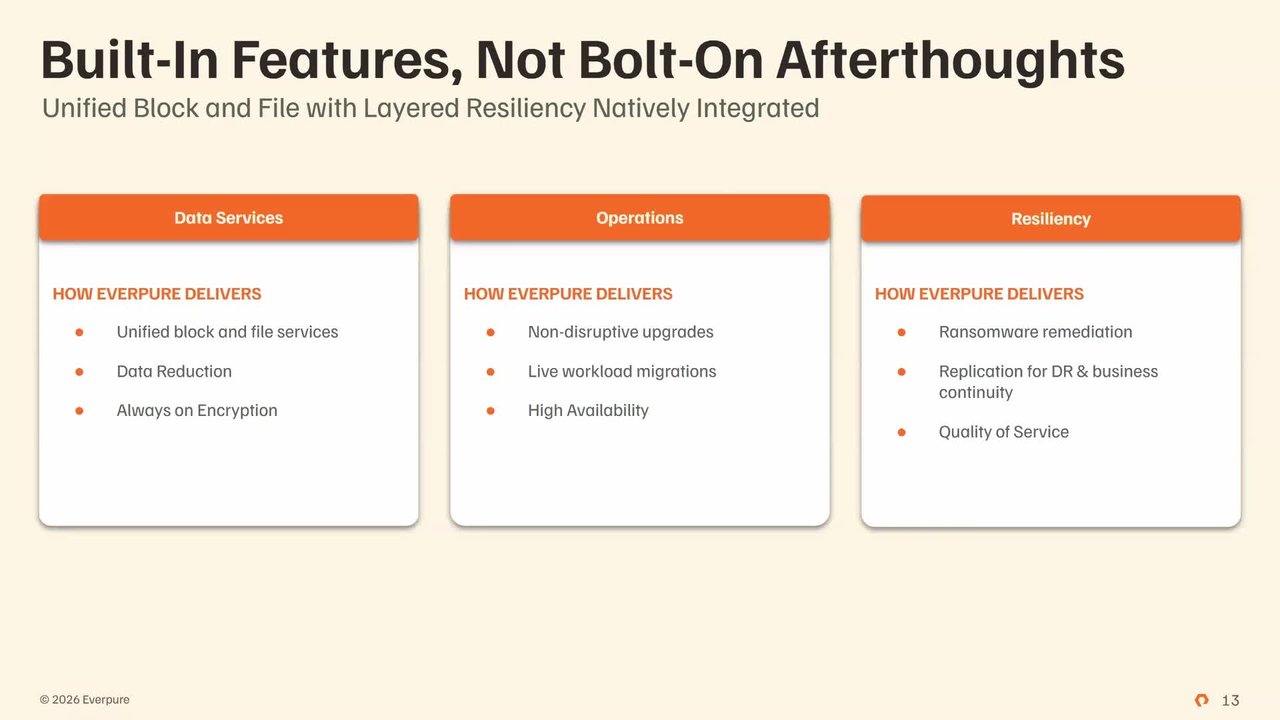
completely built in. These aren't afterthoughts. I mean, just like, we talked about being a unified array, you know, some other competitors have a file that's kinda bolted on, right? So like I remember working at one storage vendor, it was literally additional hardware front-end services to make a file sys- you know, like a, a basically build a file system
to use NFS or SMB. You know, ours is truly unified. It's baked in. It's a first-class citizen just next to block. data reduction services are You know, we come from, again, we started in 2012, NAN- NAND and flash was very expensive.
Yeah. And where the absence of resources is usually creates this, these, waves of, improvement that we've m- that like we've made to make sure to get the most gigabyte, of storage out of that same gigabyte on the SSD, right? So like dedup, compression, pattern recognition, that's really where we thrive. Always on, encryption, making sure that, we are taking the burden off of you of managing
storage day to day, right? When you buy other systems, really any other system out there on the market, the onus is on you on upgrades both from, you know, upgrading the existing system when it comes to code versions, as well as upgrading the hardware, right? We take that off with this evergreen model where if you do something like a, evergreen
forever subscription, after your- you renew your subscription, we actually will refresh those controllers, right? That's a very different model, than how other people, do that. And then we have, resiliency built all throughout the system, and that's because as storage, you know, compute is very ephemeral.
If a host dies, that kinda sucks, but HA kicks in. we have persistent, data. Like we have to protect it not only on that device with dual controllers and multiple parity across the NAND, but also being able to replicate it to different locations and do copy data management capabilities.
All that is really built in into the feature set of the system. Yeah, and I wanna comment on just real quickly, Matt, on the, the upgrade piece. Like what we're talking about for the non-disruptive upgrades, that's both the software like so Purity is our operating environment that actually runs our hardware. Mm-hmm. But we're also talking about the controllers
like Matt talked to. And the idea is when you purchase a flash array, and Matt will get into what the evergreen is like, you That chassis will always grow with you or that be meaning like we'll swap out the controllers for, let's say, you know, when our Gen 6 comes out 'cause we're on Gen 5, let's say three years from now, like those are easily swapped or replaced
without any forklift upgrades or even data movement, right? Yeah. So, you know, back when I started off in my days, it's like I got SAN A and I moved to SAN B. It's like, "Oh, I'm moving all this data over," working weekends or working in the evenings because this idea of like you just gotta do these forklift upgrades.
That all goes away with a flash array device, and that way you get your time back. You get your weekends back. You get your evenings back. I mean, we do have customers that do that, these upgrades during the day. I mean- Yeah to each their own.
Like I might be a little more belt than suspender than that, but it does work. So, I think it's a key thing to focus on from a, a quality of life and then from an operations perspective that really, uniquely makes us different. Definitely. Definitely. This is another- And you talked about the flash, Matt, so why don't you talk about- Yeah
PFMs here? Exactly. You know, a lot of people don't know this, and they're still surprised. I mean, I was surprised. Again, I've only been here a year and, and, and some change. You know, we make our own flash devices, right?
and honestly, I can remember a time where, you know, bragging about this would be like a negative thing. In 2010 to 2015, it was the world of like software's eating the world, but we are in a very different world now. This is why hardware is so expensive is hardware matters, right? Being able to source it matters.
being able to make quality devices matters. And most of the top market cac- cap companies on the market in, in Wall Street have a hardware and software component. So we talked about a lot of our You know, we will talk about a bunch of our software capabilities, our integration, what we do from an engineering perspective to code into
software, but also our benefit is the engineering around our hardware devices. So what does that ultimately mean for you? It's cool you make this, this fancy drive that has your Pure logo on a heat sink, which is awesome by the way. But what does that mean for me as a customer? lower p- lower failure rates, right?
We already Again, we were, we built in the days of 2011, 2012. I can remember in those days, even server manufacturers were only warranting the drives for three years 'cause we were so scared of how fast these drives would fail. So we developed a system in the Purity operating system to massage the NAND so that we would make them last.
Then we built our own drives to work with that Purity operating system to essentially have lower failure rates and give you the full capacity of the system versus roping some of that off for garbage collection and cell wear-out because other drive manufacturers weren't doing that like we were doing. So that gives you more, cells t- to use, higher capacity, lower failure rates,
and since we manufacture it, we can source these across the globe. This is a, you know, a very big, thing today is the supply constraints that we're facing. We are affected. Like I'm not gonna say we're not affected, but the fact that we do design our own hardware does give us unique benefits to be able to source it from different locations and have a more diverse supply chain than relying on just
the Microns or the Samsungs of the world like our other vendor, other vendors do. Yeah, I've, I've, I've, I've heard it referred to as the NANDpocalypse, which might be a little much, but I mean, you know, that did cross my Reddit feed or something one day, and I kinda, kinda chuckled about that. Yeah. one other thing I wanna add to that, Matt, is,
it's on the slide as well, is the, the ultra-dense d- drives that we a- or sleds that we actually create, we're not That's a huge differentiator too, 'cause we're not bound by the sizes like Matt just said, like a Micron or a Samsung make. Like, they may, they're like, "Oh, our biggest drive right now is a couple terabytes," or whatever. Totally.
Since we're not bound by that, but the other vendors that use those are, we can create, you know, 150 terabyte drive or sled and, you know, cram that into, like, 3U of rack space. So we're saving- Right on power cooling rack space because we're not tied directly to what the flash manufacturers offer us as an SSD, which is drastically different than what you'll see from the rest of the storage vendors on the market.
And like, like, so what does that mean for the customer, or for you as a administrator, especially when power costs are going up, rack space is coming at a, at, you know, at a price premium, floor space is becoming a price premium? We lower all of those b- by developing our own systems and making them dense as possible. That's a great call out. Absolutely great call out.
So we ta- we talked about this a little bit, but just to double-click on it, because honestly, if you're not an EverPure customer, this is kinda hard to wrap your mind around, because everyone else does this very different. and it's almost hard, to be fair, to even communicate without experiencing it. You need to experience this to truly understand it.
it's kinda like someone telling you, you know, how vMotion worked before you saw it for the first time, right? Like, you just gotta live it and feel it. But ultimately, like I said, we're taking the onus off of you to do storage maintenance, and that d- it doesn't mean just, like, building a purpose-built appliance, like the build verse buy concept. That's the lifetime of using our product.
So again, if you have, like, a Evergreen forever subscription, you go for three years, you renew that, renewal. Then on the, I believe it's the fourth or the fifth year, we will come and refresh those controllers as part of that subscription. And so now you just stayed modern.
I- 'cause usually what most people are doing is they're keeping a system around for five, maybe seven years if they can get extended warranty, then they refresh that system to the new hardware. That's extending out life on systems that are getting old really fast because technology is increasing so fast when it comes to CPUs, you know, and density of memory.
So ultimately, we take the onus off of you both from, you can call support, they'll walk you through like a Purity software upgrade. So we take the onus off of you on from the day-to-day maintenance. That's, that's one of the benefits you get here. We're proactive with our maintenance, meaning that, everything we have goes up to Pure1
unless you're a dark site. And since we have that telemetry, we can reach out to you of, "Hey, maybe you should get off that code version because we did see a bug that matches your environment," or, "Hey, we saw some telemetry that this drive is actually close to failing. We want to go ahead and schedule a time to just replace that drive now." So it is not one
single feature, it's a collection of fe- features that make Evergreen of both the software and the, the purpose of built appliance that we've built, and the business model tied behind it to keep you modern, to keep you, your system up and running, and to take the onus off you as an administrator of this system. Anything you'd add to that, Langer?
No, I mean, I think it's, it's Yeah, it's not just a You just can't view it as just a technology thing. Yes, it, our technology enables it, but it's, it's a business thing with, like, predictable costs. Like you talked about, we have SLAs. We can, you know, you can buy based off, you can lease based off capacity.
Like, there's purchasing models. So Evergreen is a, it's a whole envelope of things that when it comes to the doing the business of purchasing your storage or managing your storage, it goes beyond like a speeds and feeds conversation that just drastically improves, again, the quality of life of the backend storage that's running, you know, your virtualization
or your VMware environment. I don't know if you're like this, Langer, but I, I actually start thinking about this on other facets of my life. I'm like, "Could more companies do Evergreen for me?" Like, I think of, like, my home networking gear. That stuff is like seven, eight years old.
Wouldn't it be nice if I had a company that just came every three years, refreshed it to the latest gear? Networking equipment doesn't quite change as fast as storage- Sure not quite the same scenario. But you can understand, like, when you build all these systems, you guys know you're
constantly up to, like maintaining that system. A part of it is hardware refreshes. We do that for you in this model- Mm-hmm right? Which is a very, a very different model. Yeah. So now we're gonna get into like, more of where are our integration points into VMware.
Like, you've talked about it at, you know, the, the initial slides of like, I fit into vCenter, I plug into Aria or, to VCF Ops or automation. These are, like, those actual technical products. So the number one thing I mentioned, you know, we started all the way back in 2012 creating this, the vSphere client plugin.
This is where you really realize the most engineering benefit. You can spend your entire day in vCenter and not have to go to Purity, which is our operating system. And so for some people that have small teams or consolidated teams with multiple roles and responsibilities, this makes a real tangible difference on your day-to-day, even if you do
have separate teams. So like one of the pushbacks that I get in the field of, I don't necessarily I'm a storage admin. I don't want my vSphere users, you know, deploying resources. I can understand that. There's a roles and responsibility separation. But we have a fully functioning RBAC control system within this.
It plugs right into vCenter and makes new, RBAC controls to where you should at least install it just so y- the same, your virtualization teams and you can be on the same page. They can go to, a l- you know, a data store in vSphere and know it's on that array and named that on that array. Just the visibility alone can be really massive to make sure the teams work in unison,
specifically the storage and the VMware administrator teams to w- to work together. So something definitely, worth considering we have the Pure1 virtualization assessment. so if you, you know, wire up, basically, we have something called the analytics collector, and you wire that up to Pure1, we can take that telemetry from vCenter and do a- analytics on that, right?
So most people know the process. Usually I just grab an RVTools, and I start doing some fancy, you know, pivot tables and stuff in Excel. This is a fully fledged assessment product that pulls basically the same information that an RVTools w- would do, but give you more, a, a nuanced and specific recommendation around your vSphere infrastructure.
And especially in a day and age, again, of, supply constraints that we're running into, you know, you may wanna run these systems more hot. You may wanna understand which clusters are, maybe misappropriated for CPU memory resources. and then also when you're looking at VCF licensing, what does that mean if I, you know, shrink this down and I looked at less cores?
maybe there's a potential software, licensing savings there too. So, this can be really beneficial for those that are, looking at refreshing their infrastructure, understanding their infrastructure in, in deeper detail. This, the VM analytics is a lot more closer in attune to trying to get to a, meantime before resolution faster, right?
so if you, have the same, VM analytics appliance wired up to Pure1, you will get this screen in your Pure1, login. So this is the VM topology screen when you click on that fleet and virtual machines. It allows you to see all the layers that make up a virtual machine, including the storage pieces of it, 'cause it's stitching both, the vCenter telemetry as well as, like, the Purity
telemetry into it. and it doesn't have to be just Pure. This does work with third-party arrays as well. But you can see here as I've clicked, these specific VMs, these were VMs I was actually running with, FIO runs.
When you tick these boxes, they'll overlay the metrics, so you can actually see, like, the latency on these virtual machines, the IOPS on these specific virtual machines. And you can even It's, it kind of hard to see from here, but if you look at the selections, there's a little widen out view. You can click that, and you can actually see it full screen, so you can
see all, those metrics. One real benefit to this, that I see in practical sense is separating, things that you typically have to go into ESXi top. ESXi top is typically still the number one way to truly, troubleshoot it, like, intense scenarios.
But this at least gives you the layers that you would typically go in ESXi top of, like, what is my, guest average latency, so that GAVG versus disk AVG versus kernel level latency. That's kinda what this is giving you, is where is latency being experienced across the stack? So I know if it truly is, is it the storage network?
Is it the SAN itself? Is it overloaded? That can happen. or is it maybe, like, a driver or firmware issue further upstream? Or the nasty culprit that people run into, who created that vSphere snapshot that they didn't delete?
Right. 'Cause we all know that has happened too. Yeah. So. Yeah, man, you talk ESX- ESXi top, you're, you're really, you're talking my language, Matt. And then, you know, the, the thing I like to say for this, for VM analytics that you kinda used the meantime, I say this is meantime to innocence for the storage team or the
virtualization team- Totally for when tho- that database administrator calls up and says, "Hey, my queries are slow," or, "My database is slow." And you're like, "I know it's not my storage," or, "I know it's not my VM." But this is, like, the get out of jail free card for that pr- meantime to innocence to be like, "No, I think it might be on your side." So- Yeah but yeah- No, right this is a, a great tool.
again, just like the other ones we ta- talked about at the beginning, like, this is included with FlashArray. The, the thing is, is, you have to deploy an OVA on site, you know, in your VS- VMware environment, and then this just phones home to our Peer1 site. So very easy to do, but just included as well, and it's, you know, again, for the insights that you can get from it, definitely a
must-have if you're a Fl- FlashArray customer, whether existing or po- potentially looking into it down the road. Now I know we've, I, I've been pretty long-winded on a couple of these slides, so we're gonna start, like, speeding up the pace here 'cause I know we're not quite at time, but, getting close there. We wanted to double-click on some more technical, integrations into VMware and some
more benefits. But, you know, this is a technical audience. Hopefully, this dives deep and kinda wets the, the technical appetite that most people have here. I know that I have. So I talked about the vSphere plugin. It's not just day one and day two.
Like, I, I've been doing some fun stuff, to, to, like, basically count the clicks. That, that sounds really fun, right? Count clicks of like what it would take to do manual to-do snapshots versus using the plugin. I think the biggest one that I saw that was just massive is snapshot management. Listen, if you've done this, like me, me and Linger have done for a long time, you know how
to do it. Like, and that's, that's awesome. Do you like doing that all the time? Do you like, you know, mounting a new vSphere data store, resignaturing that data store, finding that VMX file, registering it, storage vMotioning it over? The truth is, is like that's a lot of clicks.
There's a lot of potential mistakes that could be made. Wouldn't it be nice if that was just done through code? That is what the plugin does. When I did this analysis, I think it was like an 82% reduction in the number of clicks through doing it manual versus doing it in the plugin.
I'm not gonna go under each one just because of a time constraint, but that same thing applies maybe not in the same magnitude for like cluster, cluster access configuration, data store management, and unmap scheduling. But that gives you, like, an example of the technical benefits of running the vSphere plugin, and it's free.
It's not, it doesn't have any additional cost. It's baked into the product of FlashArray if you have a FlashArray system for this. I know you're gonna go quick, but my one add onto this is if you- 'Cause you mentioned it earlier, if you are an iSCSI environment, using this to set up your ESXi host and do the networking for ES- for iSCSI configuration alone is worth installing this. Totally.
I don't know how many times I've seen, you know, improperly mapped multi-path IO in customer environments. Like- Yeah just that alone, this You right click on it, you say iSCSI, you sa- and it does all of it for you. And this, yeah, and, and this comes from Langer's background. If you're a partner watching this right now and you're doing installs, save yourself the
time- Yeah install the plugin. Do that especially for iSCSI. That's a great- Yeah, especially if you, you're doing, like, 10 or more hosts and you're just constantly, like, right clicking and, you know, passive NIC or not you, like, ugh, don't, just don't even worry about it.
But anyways- sorry, Matt, keep going. Yeah. Well, and then so, when we talk about replication, and this will be really big when you're looking at going to VCF. You know, some customers are looking at doing, you know, continuing a metro stretch cluster. That would be more on the far right side of your screen.
That's like active cluster. If you have RPO and RTO of, like, near zero, zero for RPO but, you know, automated for RTO, so, you know, 30 seconds, that is the active cluster technology. That is, synchronous technology, but it's more intense on the network, right? You need to have at least five milliseconds of round trip latency between sites.
so that is, again, a metro area type of use case. Active DR is like our near sync, type of technology where it's not the traditional asynchronous replication where you just set every five minutes. It's going to try to do it as fast as it possibly can. So that will have a slower RPO or a, a slightly, you know, near zero RPO that could,
depending on your, your links between, be a little bit more, but it's going to keep it as close to zero as possible automatically versus just setting a scheduler. And then async d- you know, disaster recovery, that's, that is what you would traditionally see on most products of I want to have replication happen every 15 minutes or 20 or maybe once every hour, and especially if you have a weaker WAN link and you know it takes a
long time to do it, you know, that could still be a great use case, for it. Some people use, you know, a combination of these technologies too, to keep in mind. Yeah, and the RTO for active cluster, I just wanna throw out the reason why that's roughly 30 seconds is remember in the stretch cluster, this is basically a vSphere HA event. Yeah. So the RTO is basically is however how fast
your VMs boot, you know? Like, so if they take a long time, you know, if it's a SQL box, like all the services fire. So that's why it's roughly 30 seconds. It could be faster, it could be slower, but that's a, it's a VMware HA event, so it's more about what those VMs are actually doing, not what the array like, you know, waiting for
services to spin up and whatnot so. Totally. VAAI, you probably, like, this gets really kind of swept under the rug, i- in recent conversations, but it's really worth noting. This has been around for a long time. we've been integrating within the VAAI for a long time.
some of these things you never even see, you just benefit from. For example, you may be cloning virtual machines and notice it goes really fast and never wondered why that was. That's xCopy, right? That's what's happening in the background.
You're like, "Wow, that two terabyte VM I just right click cloned, I didn't do anything on the array, but it just happened." That is the value of like VAAI integration that we have here that o- honestly we don't talk about enough at Everpure. also if you do like, you know, thick provision VMs, you know, that is essentially, you know, vCenter's just gonna say, "Hey array, go ahead and write out these zero," right?
Same zero pages. So that happens even faster again for these eager zi- EZT, eager zero thick creations. SCSI Unmap, if you L- listen, if you're on like, VMFS 5, I had a customer the other day that had this. That's not automatic, on VMFS 5, it is on 6, but this is also where the plugin comes into play.
We do support SCSI Unmap on VMFS 5, but you need to go run that. Isn't it nice that the plugin has a right click run, storage reclamation? that is in the plugin, so you can do that, but you should also be on VMFS 6. Make sure that you're doing that for your w- for your LUNs. And then of course, ATS locks.
This was a big thing in the earlier days of like, you know, locking the whole LUN versus just locking the sector. but it takes effort from the storage vendor like us to make sure these things work, and we definitely work with VAAI. Yeah. And I will say it's file and block.
Yeah. Just for those NFS folks out there, you know, raise your hands, but, just to call out it is for block and for file as well. Yeah, we should have, had one on that 'cause I know, like for example, 9.1 has NFS Unmap. We're one of the first ones to support that. So that goes for file and block workloads.
It's a great, great, call out. multi-domain VCF, I think this is one of our last slides and then we'll wrap it up. you know, you're gonna be looking at your architecture. Hopefully what you're taking away from this is that if you have FlashArray, it doesn't matter the protocol, we will be able to support you in VCF 9.
But you will be thinking about how do I split up my workload domains? You know, these are vCenter boundaries. Maybe I have business unit A that has workload domain A, and I have business unit B that has workload domain B. How can I use my FlashArray to make sure that I give them the services they need in this multi-tenant environment?
We have tons of capabilities here. We could do, you know, quality of service configuration for these. one of the things we're n- we don't have on this screen that you may have heard of, we have a concept of realms so that you can make users in separate realms and so they can't You know, if you have those users logging into those realms, they can't cross the path even
though they're on the same FlashArray, a common shared array. so we have so many capabilities that really align up with the entire cloud platform to make sure the storage matches your hypervisor's capabilities. Volume isolation, quality of service, you know, per domain, protection per domain with these replication technologies that we've been talking about.
And again, still that independent scaling, to meet whatever the domain's need is versus just being stuck with the storage capacity that I've already provisioned for that domain, right? Pooling these resources together, to b- make sure that you're not, having silos of capacity. All right, Matt. You out of breath?
I am. I was so excited and I just kinda I'm trying to work for that Jedi, you know- Those roads, yeah row is what's going on and I, I should've, I should've tried my Yoda, voice, but I was too scared. Next time. Next time. Next time. But hey, I, I do wanna thank everybody.
F- first off, thank you, Matt, for all that and, you know, for those that have made it this far, thank you very much for, you know, listening and, and dealing with Matt and I. But if you are interested more, we've got a lot of different resources you can see here on the screen so you can learn more about Everpure as a company or our FlashArray solutions.
scan these QR codes. Pure 360 is our demo page where you can basically see myself or Matt walk through actual demonstrations of the vSphere plugin or Active Cluster, our replication technology, where you can actually see them, and then we'll show you actually how where you can go to our test drive and actually put them to use yourself.
Everpure, of course, that will take you to our main site. And then we didn't get into it specifically, but the FlashArray is a product family, so there are different sizes and speeds and capacities based off what your workload is or what your requirements are. We basically have one for everything, so that's where the XL, the
X, and the C's come in. but you go and scan that QR code and you can check that out, information there. And then finally, I do just wanna say thank you again. I hope everybody enjoys the rest of your day and the rest of your week. Thanks again, Matt. Thanks, guys.

Matt Webb
Field Solutions Architect, Everpure

Jason Langer
Senior Technical Evangelist, Everpure
VMware Cloud Foundation gives organizations more flexibility than many teams assume, but the storage architecture underneath it has a direct impact on how easy the environment is to deploy, operate, protect, and evolve over time. In this session, we will show how Everpure complements VMware Cloud Foundation by helping simplify storage choices across greenfield and brownfield deployments while improving operational consistency through vCenter integration, automation, and day-2 visibility. We will also cover how Everpure helps strengthen resilience for VMware environments with VAAI for NFS, transparent failover design, and ActiveCluster for File to support zero-RPO, non-disruptive operations for critical workloads. Attendees will leave with a practical understanding of how to align storage decisions to operational outcomes and make VMware Cloud Foundation easier to run in real-world environments.
Key Session Takeaways
- How VMware Cloud Foundation supports flexible deployment models and storage choices across both greenfield and brownfield environments.
- How Everpure helps simplify VCF operations through vCenter integration, automation, and improved day-2 visibility.
- How capabilities such as VAAI for NFS and resilient storage design can help improve operational consistency and availability for VMware environments.
We Also Recommend...
Personalize for Me
My Updates
No updates at this time.